StayActive for Wear OS
Log your gym workouts on Galaxy Watch and Pixel Watch
StayActive's Wear OS app puts your AI workout plan on your wrist. Log every set with the weight and reps already filled in, and feel a buzz when your rest is over. Your phone saves the workout to your history and progress.
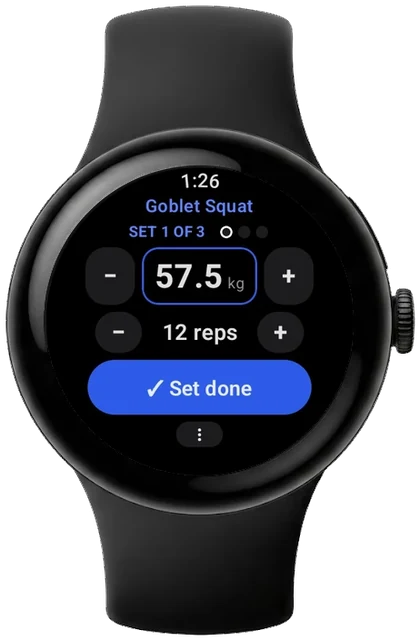
What you can do on your Wear OS
Today's workout on your wrist
Your week and every exercise of the day, with the weight and reps from your plan.
Log a set in one tap
Adjust weight and reps with the rotating bezel, the crown or the buttons, then tap Set done.
Rest timer that buzzes
The rest timer starts on its own and buzzes when it is time for the next set, even with the screen off.
Pick up where you left off
Started on your phone? Continue on the watch with the sets you have already done.
Saved on your phone
Finish on the watch and your phone saves it, with your progress and personal records.
Also on your phone
Your set and rest timer show as a live update on your Android phone.
How to set it up
- Get StayActive on your phone, sign in and make a plan.
- Install StayActive on your watch from the Play Store on the watch, or from the Play Store on your phone.
- Open StayActive on the watch and tap today's workout.
You need: A watch with Wear OS 3 or later, such as Galaxy Watch 4 and newer or Pixel Watch, paired with an Android phone running StayActive.
Frequently asked questions
Does StayActive work on Samsung Galaxy Watch?
Yes. StayActive runs on Galaxy Watch 4 and newer, Pixel Watch and other watches with Wear OS 3 or later.
Is the Wear OS app free?
Yes. StayActive has no subscription and no ads, on your phone and on your watch.
Do I need my phone with me?
Your plan is on the watch and your workout is kept there, then your phone saves it when they connect.